Search Arrivals
HEMS - Hotel Manager
Search Arrivals
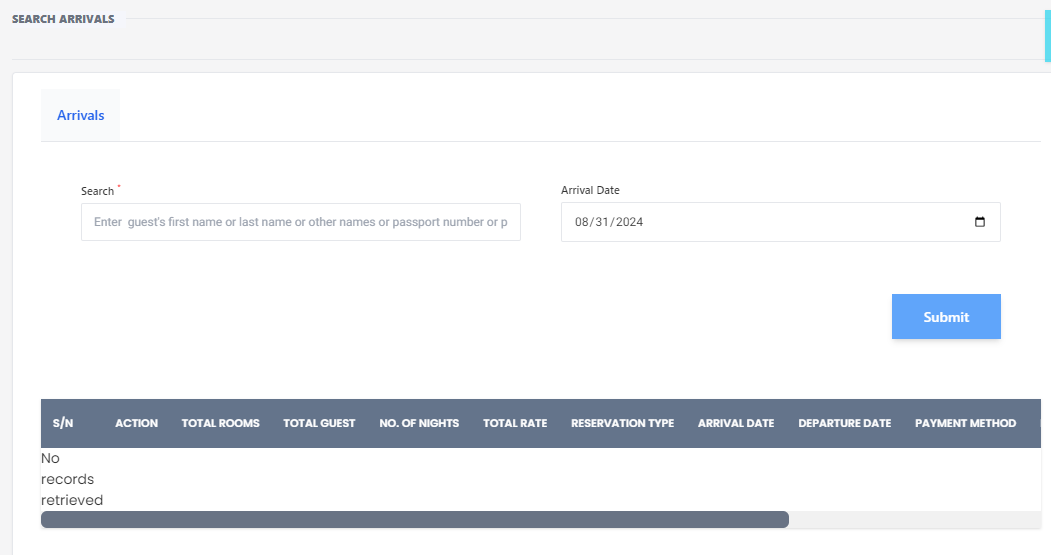
The Search Arrivals page allows hotel staff to search for guest arrivals based on various criteria. This page is essential for managing and tracking guest check-ins efficiently.
Features
Search Form
- Guest Information: Enter the guest's first name, last name, other names, or passport number to search for their arrival details.
- Arrival Date: Select or enter the arrival date to filter the search results.
- Submit Button: Click the 'Submit' button to execute the search based on the provided criteria.
Search Results Table
- S/N: Serial number of the search results.
- Action: Actions that can be performed on the search results.
- Total Rooms: Number of rooms booked by the guest.
- Total Guest: Number of guests included in the booking.
- No. of Nights: Duration of the stay in nights.
- Total Rate: Total cost of the booking.
- Reservation Type: Type of reservation (e.g., online, walk-in).
- Arrival Date: Date of arrival.
- Departure Date: Date of departure.
- Payment Method: Method of payment used by the guest.
No Records Retrieved
- If no matching records are found, the table will display "No records retrieved".
Usage
- Enter Search Criteria: Fill in the guest's information and/or arrival date.
- Submit Search: Click the 'Submit' button to view the search results.
- Review Results: Check the table for the guest's arrival details and perform any necessary actions.
This page helps streamline the check-in process by providing quick access to guest arrival information.