Search Arrivals
HEMS - Hotel Manager
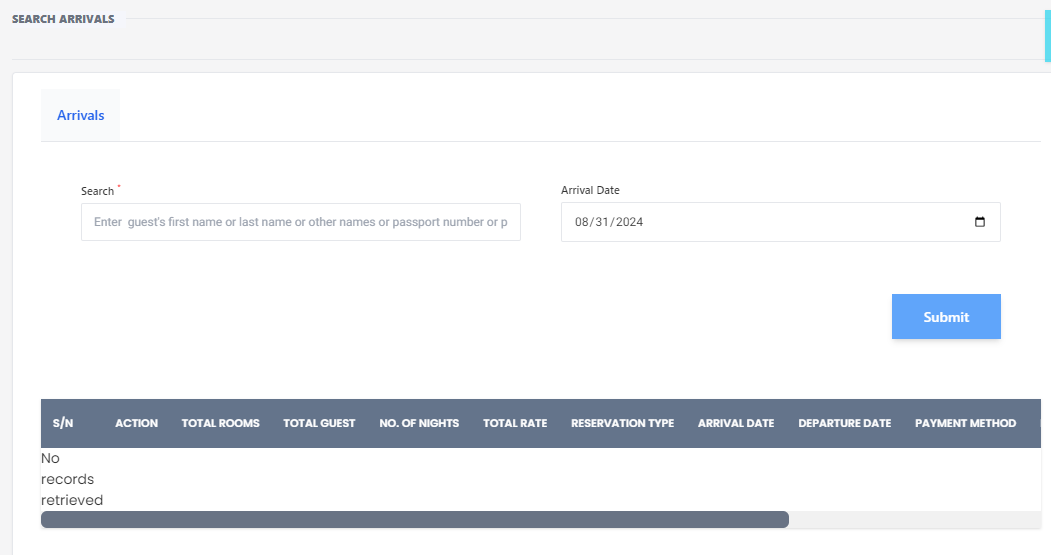
Search Arrivals
The Search Arrivals feature allows hotel staff to quickly find and manage guest arrivals. This feature is essential for ensuring a smooth check-in process and maintaining accurate records.
How to Use the Search Arrivals Feature
-
Enter Guest Information:
- First Name: Enter the guest's first name.
- Last Name: Enter the guest's last name.
- Other Names: Enter any other names the guest might have.
- Passport Number: Enter the guest's passport number if available.
-
Select Arrival Date:
- Use the date picker to select the guest's arrival date.
-
Submit Search:
- Click the Submit button to execute the search.
Search Results
After submitting the search, the results will be displayed in a table format with the following columns:
- S/N: Serial Number of the record.
- Action: Actions that can be performed on the record.
- Total Rooms: Number of rooms booked.
- Total Guests: Number of guests in the booking.
- No. of Nights: Number of nights the guest will stay.
- Rate Type: Type of rate applied to the booking.
- Reservation#: Reservation number.
- Arrival Date: Date of arrival.
- Departure Date: Date of departure.
- Payment Method: Method of payment used.
If no records match the search criteria, the message "No records retrieved" will be displayed.
Example
Here is an example of how the search results might look:
| S/N | Action | Total Rooms | Total Guests | No. of Nights | Rate Type | Reservation# | Arrival Date | Departure Date | Payment Method |
|---|---|---|---|---|---|---|---|---|---|
| 1 | Edit | 2 | 4 | 3 | Standard | 12345 | 09/02/2024 | 09/05/2024 | Credit Card |
Use this feature to efficiently manage guest arrivals and ensure a seamless check-in experience.