Lost Ane Found Register
HEMS - Hotel Manager
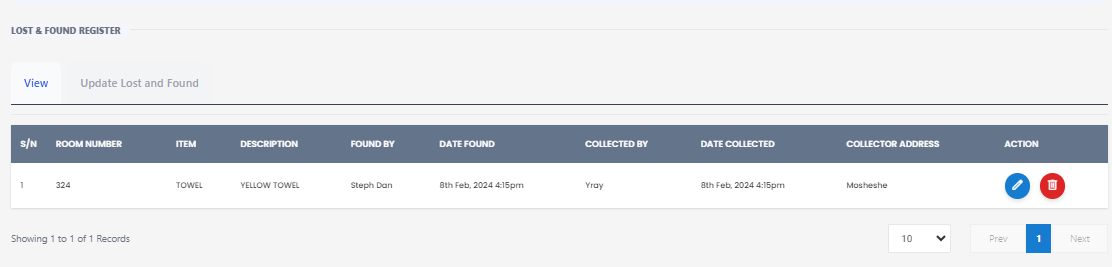
Lost and Found Register
This view allows staff to manage and track items that have been found and are awaiting collection. Below is a detailed explanation of each column and its functionality:
Columns
- S/N: A unique serial number for each entry.
- FOUND NUMBER: A unique identifier assigned to each found item.
- DESCRIPTION: A brief description of the found item.
- FOUND BY: The name of the staff member who found the item.
- DATE FOUND: The date when the item was found.
- COLLECTED BY: The name of the person who collected the item.
- DATE COLLECTED: The date when the item was collected.
- ACTION: Icons for actions such as edit (pencil) and delete (trash can).
Example Entry
| S/N | FOUND NUMBER | DESCRIPTION | FOUND BY | DATE FOUND | COLLECTED BY | DATE COLLECTED | ACTION |
|---|---|---|---|---|---|---|---|
| 1 | 0014 | Yellow Towel | Troy | Sep 29th, 2021 | Michelle Ye | Jan 20th, 2022 | ✏️ 🗑️ |
Actions
- Edit: Click the pencil icon to edit the details of the found item.
- Delete: Click the trash can icon to delete the entry from the register.
Notes
- Ensure all fields are filled out accurately to maintain a reliable record.
- Regularly update the register to reflect the current status of found items.
This view helps in efficiently managing lost and found items, ensuring that they are properly logged and tracked until they are returned to their rightful owners.