View Build
HEMS - Hotel Manager
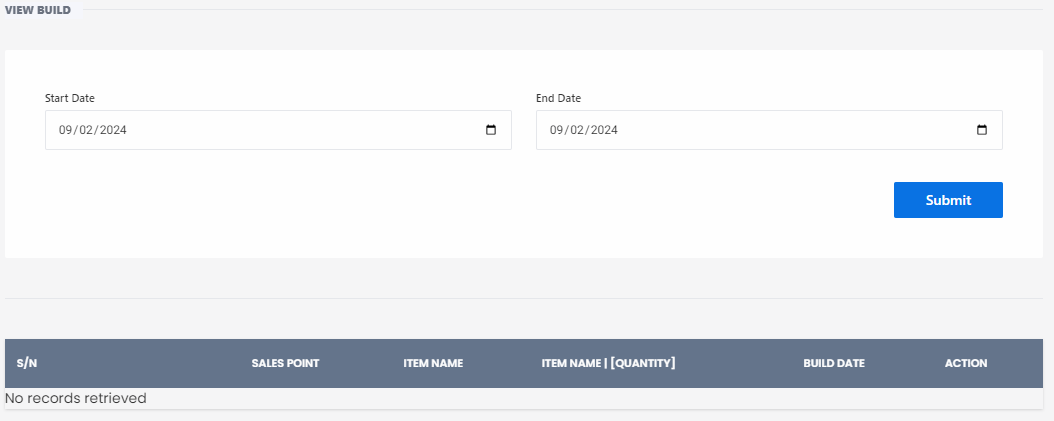
View Build Page
The View Build Page feature allows users to view and manage records of items built within a specific date range. This feature is essential for tracking inventory, sales, and production activities.
How to Use the View Build Page Feature
-
Select Date Range:
- Use the date pickers to select the Start Date and End Date for the records you want to view.
-
Submit Search:
- Click the Submit button to retrieve the records for the selected date range.
Search Results
After submitting the search, the results will be displayed in a table format with the following columns:
- S/N: Serial Number of the record.
- Sales Point: The department or sales point where the item was built.
- Item Name: Name of the item.
- Item Name [Quantity]: Name of the item along with the quantity built.
- Build Date: Date when the item was built.
- Action: Options to perform actions on the record (e.g., edit, delete).
If no records match the search criteria, the message "No records retrieved" will be displayed.
Example
Here is an example of how the search results might look:
| S/N | Sales Point | Item Name | Item Name [Quantity] | Build Date | Action |
|---|---|---|---|---|---|
| 1 | Restaurant | Tomato | Tomato [10] | 09/02/2024 | Edit/Delete |
| 2 | Bar | Lettuce | Lettuce [5] | 09/02/2024 | Edit/Delete |
Use this feature to efficiently track and manage your inventory or production records, ensuring all items are accurately recorded and easily accessible.